
Full Introduction to Amazon Seller Central and Shipment Creation (Complete Guide)
Amazon Seller Central stands as the essential framework which supports all Amazon business operations. Every seller needs to learn the operational details of Seller Central because their business requires them to use this platform for their Wholesale and Private Label and Online Arbitrage and Dropshipping (FBM) operations. The fundamental skills which sellers must develop will help them avoid expensive errors while they build stronger account performance and better inventory management and increased long-term earnings.
In this guide by ecomleaner, we will cover:
What Amazon Seller Central is
Key features and dashboards
Account setup and navigation
Inventory and order management
FBA vs FBM overview
Step-by-step shipment creation process
Common shipment mistakes and best practices.
Amazon Seller Central Dashboard Overview
Dashboard Key Sections
1. Home
The system displays a sales overview 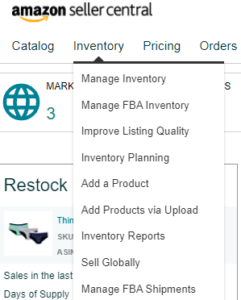
The system displays alerts about account health
The system displays current inventory conditions
The system displays alerts about performance issues
2. Inventory
The system enables users to control their complete inventory stock.
Users can create new products through this process.
The system displays FBA inventory stock
Users can create their inventory management process through this system.
The system provides a solution to solve inventory that has become stranded.
3. Orders
The system provides tools to handle all order processing needs.
The system generates reports about orders.
The system processes item returns.
4. Advertising
Sponsored Products
Sponsored Brands
Sponsored Display
5. Reports
The system generates business reports
The system generates fulfillment reports
The system generates payment reports
The system generates advertising reports
6. Performance
The system displays account health information
The system displays user feedback
The system displays A-to-Z claims information
The system displays information about policy compliance.
7. Growth
Brand Analytics
Amazon programs
Business growth paths.
Amazon Seller Central Dashboard Overview
What Is Shipment Creation in Amazon Seller Central?
Shipment creation involves sending your products to Amazon Fulfillment Centers through FBA.
The process establishes two things:
The proper inventory reception process
The correct warehouse distribution of products
Products can enter the sales process after stock availability
The creation of a shipment with multiple errors results in:
Inventory loss
Check-in procedures experience delays
Amazon incurs financial penalties
Types of Amazon Shipments
1. Individual Shipment
The shipment process allows for one product to be delivered through one delivery method which
The shipment process allows beginner users to complete their shipment process activities through its
2. Case-Packed Shipment
The shipment process includes multiple identical units which customers pack inside one box.
The shipment process enables fast product receiving which Amazon prefers.
3. SPD (Small Parcel Delivery)
Small boxes with UPS service and FedEx service and DHL service
4. LTL / FTL (Less Than Truckload / Full Truckload)
The shipment process involves palletized shipments which exist in large quantities.
Step-by-Step Process: Creating an FBA Shipment
Step 1: Convert Listing to FBA
Access the inventory management section
Choose the desired item
Select the option to switch to Amazon fulfillment
Step 2: Send/Replenish Inventory
Select the option to send or restock inventory
Select the address from which you will ship
Select the packaging method:
Single products
Products that come in cases
Step 3: Enter Product Quantity
Enter the total number of units you plan to ship
Verify all details to prevent future reconciliation problems
Step 4: Product Preparation Requirements
Amazon may require:
Products to be packaged in poly bags
Products to be protected with bubble wrap
Expiration dates
Suffocation warnings
You can select between: 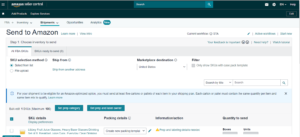
The seller preparation option which is free when executed properly
The Amazon preparation service which requires payment
Step 5: Labeling
You will be asked to label:
Product labels (FNSKU)
Shipping box labels
Best practice:
The FNSKU labels should always be used because they prevent product mixing with other inventory
Step 6: Shipping Plan Review
Amazon will:
Designate specific fulfillment centers for products
Occasionally divide inventory into multiple delivery packages
You can:
Approve the division of shipments
Access the Inventory Placement Service which charges an additional fee
Step 7: Choose Shipping Method
Small Parcel Delivery (SPD)
Amazon offers discounted shipping through its partnered carriers which includes UPS
LTL / FTL
The shipping method requires pallets
The shipping method requires adherence to Amazon’s guidelines regarding pallet usage
Step 8: Print Labels and Send Shipment
Create printing labels for boxes
You need to attach the labels in the proper way
You can choose between two options to send your package to the delivery location
Your shipment status will show:
- Working
- Shipped
- Delivered
- Checked-in
- Receiving
- Closed
Shipment Status Explanation
Shipped status means the carrier has collected the shipment which is now in transit.
Delivered status indicates that the shipment has arrived at Amazon FC.
Checked-In status shows that Amazon has begun the process of scanning incoming boxes.
Receiving process involves staff members who count all incoming units.
Closed status means all inventory has been prepared for sale.
Receiving process needs 3 to 14 days to complete and may extend beyond that time during peak seasons.
Common Shipment Creation Mistakes
❌ Wrong quantity entered
❌ Missing or incorrect labels
❌ Mixing SKUs in case-packed shipments
❌ Poor packaging
❌ Ignoring prep requirements
These mistakes can cause:
- Inventory discrepancies
- Amazon fines
- Account warnings
Best Practices for Smooth Shipments
✅ Always use FNSKU labels
✅ Keep box weight under Amazon limits
✅ Take shipment photos before dispatch
✅ Track shipments daily
✅ Reconcile inventory after receiving
✅ Avoid over-sending slow-moving products
Managing Shipments After Dispatch 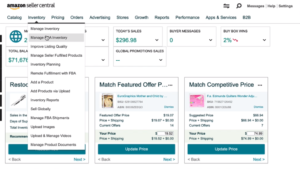
Inside Seller Central:
Users have ability to track shipment status
Users can obtain shipment documentation
Users should create a reconciliation case for any missing units
Amazon allows claims for:
Lost units
Damaged units
Missing units
Why Seller Central Mastery Is Critical for Success
Sellers can enhance their business operations by learning both Seller Central and shipment creation process.
Sellers can reduce operational mistakes and boost their inventory turnover while building their account security to operate their business with.
Sellers can expand their business operations more effectively through fast growth without encountering major business threats.
Most beginner sellers fail because they cannot manage Seller Central correctly not because their products are bad.