
One of the major tasks during the start or growth of an e-commerce business is listing a product on Amazon.
A great product listing with efficient SEO can do more than just attract your product to different Amazon search results; it can also significantly improve your conversion rate and sales. 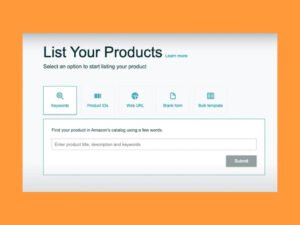
And this comprehensive guide from Ecomleaner will teach you the ins and outs of listing a product on Amazon, including the step, by, step part, best practices, common mistakes, and how to optimize your listings.
1. Open an Amazon Seller Account:
Set up an Amazon seller account is the first step that you need to do if you want to list a product.
Sellers Account Types:
Individual Account:
- No monthly fee$0.99 per sale
- Best for beginners
Professional Account:
- $39.99/month
- No per-item fee.
- Access to PPC, reports, and bulk listing tools
Required Information:
- Government, issued ID
- Bank account details,
- Credit/debit cardTax information
- Phone number for verification.
- After verification and approval of your account, the first thing to do is to log in to Amazon Seller Central.
2. Choose the Right Product Category:
Selecting the correct category for your product is the first and most important step to ensure that your product is not only visible to your target customers but also that you comply with the marketplace rules.
Reasons why Category Selection is Crucial: 
Defines the Attributes You Need to Provide.
Influences how your product is Ranked in the search results.
Determines the Kind of Fees and Limitations.
Some categories like Health, Beauty, Grocery, and Electronics require approval.
Always check category restrictions before listing.
3. Decide What Type of Listing You Need:
When you want to list a product on Amazon, you have only two options:
Adding a Product That is Already on the Platform. If the product is already on Amazon:
Look for the product on Amazon.
Click “Sell This Product”Match the existing ASIN.
Making a New Product Listing.
If you have a new product or it’s your own private label:
Go to Catalog Add Products. Choose “I’m adding a product that’s not yet on Amazon. “Produce a new ASIN
4. Enter Product Details (Core Listing Setup):
This is the stage where you decide and explain how your product will look on Amazon.
Product Title:
Up to 200 characters. Include main keyword + brand + key benefit. Do not stuff keywords.
Example:
Stainless Steel Water Bottle BPA Free, Leak Proof, 750ml | Brand Name
Brand Name:
- Use the brand you’ve registered
- Brand Registry advised to ensure protection
Product Description:
Detail features, benefits, and scenarios for use
Write to customers rather than merely to search engines
Divide into short paragraphs for ease of reading
5. Optimize Bullet Points (Key Features)
Bullet points have a great influence on conversion rate.
Best Practices:
Use 5 bullet points
Each bullet point should start with a benefit, focused phrase.
Naturally include secondary keywords 
Example:
Robust stainless steel construction ensures durability.
Isothermal to keep cold drinks for 24 hours and hot drinks for 12 hours.
Travel and gym friendly with leak-proof lid
6. Upload High-Quality Product Images:
Pictures rank as one of the top factors for both ranking and conversion.
Amazon Image Guidelines:
- At least 1000 1000 pixels
- Main image should be on a white background
- Product should take up 85% of the image space
- File formats allowed: JPG, PNG, or TIFF
Recommended Images:
- Product main image
- Product in use/lifestyle image
- Graphic information/infographic image
- Product details/close-up
- image Product packaging image
7. Add Search Terms (Backend Keywords):
Backend keywords are the ones that your product will get ranked for, however they will not show to your customers.
Backend Keywords Tips:
No commas
Do not use the same keywords as in the title
Put misspellings and variants
Max 250 bytes
Example: steel bottle water flask gym travel bottle
8. Set Pricing and Quantity:
Pricing Strategy:
Look up the price of similar products from your competitors.
Don’t forget to take into account the profits pie, fees of Amazon, etc.
It is always better to start slightly lower for new listings. 
Inventory Options:
FBA (Fulfillment by Amazon): Amazon will take care of storage, shipping and returns.
FBM (Fulfillment by Merchant): You do the fulfilmentFBA is the way to go for first, time sellers as it gives them eligibility for the Prime program.
9. Select Shipping and Fulfillment Method:
Fulfillment Options:
FBA: Faster delivery, higher trust.
FBM: More control, lower fees for some products.
Decide depending on the size of the product, margin, and logistics.
10. Review and Publish Your Listing:
Before going live:
- Proofread your text and check formatting.
- Make sure all the required fields are filled.
- Make sure the category is correct.
- Click Save and Finish to put your product out there.
11. Optimize Listing After Launch:
Optimization of your listing after the launch is a never-ending cycle.
Post, Launch Optimization Tips:
Check keyword rankings.
Refresh your photos based on the conversion data. 
Launch Amazon PPC campaignsGet customer reviewsGo for A+ Content (Only Brand Registered sellers can use it)
Final Thoughts:
Knowing the correct way of product listing on Amazon is the key to success in Amazon FBA, private label, and wholesale business models. A perfectly optimized product listing does not only help the product to be found easily but also build trust and result in regular sales. Use this detailed guide by Ecomleaner to learn how to make top-notch Amazon listings and be ready to face the competition in any marketplace.
- how to list product on amazon
- amazon product listing
- amazon seller listing
- amazon fba listing
- amazon product upload
- amazon seller central listing
- amazon listing guide
- sell products on amazon