Detailed Guidelines for Opening an Account on Amazon:
Here’s a comprehensive and easy-to-follow guide to properly setting up your Amazon account.
Step 1: Visit the Amazon website or launch the desktop app.
open amazone sites on pc or phone.
press on the button create account.
click Start Here.
Get the Amazon app open.
Select “Make an Account.”
Step 2: Input Your Basic Information:
The following details will be requested by Amazon:
Full name: Use your true name as it appears on bills and other documents.
Address for email: Verification requires a working email.
Password: Pick a secure and distinctive password.
After entering these details, click Create Your Amazon Account. 
Step 3: Check Your Email:
An OTP (One-Time Password) will be sent to your email by Amazon.
Get your inbox open.
Make a copy of the code.
Put it in the field for verification.
Click “Verify.”
This feature effectively deters unauthorized users from trying to access your account.
Step 4: Add a Phone Number (Recommended):
Linking your account to your phone number is surely one of the easiest ways to increase your security level. Thus, you will be able to: If you have forgotten your password, you can reset your account..
Step 5: Personalize Your Account:
After the setup, let your account work for you by reflecting your shopping habits. Add a Shipping Address Head to Your Addresses and write down the place where you want the delivery to be made.
Save Payment Methods
Store your debit or credit card details by adding the card to Payment Options.
Set Preferences
You can set your preferences for:
LanguageCurrencyDelivery regionBy customizing your account, Amazon can
show the most relevant products and services.
Step 6: Consider Amazon Prime:
If you are a frequent shopper, Amazon Prime will make your life easier and be a good value of money.
The advantages of Prime are:
Free one, day or two, day deliveryPrime Video (movies and shows)Prime MusicPrime Reading (ebooks, comics, magazines)Exclusive Prime, Only dealsEarly access. 
Step 7: Examine the Amazon Dashboard:
You can manage everything on your Dashboard after logging in:
Track packages, returns, and previous orders with My Orders.
Save items for later with My Lists. Change your email address, password, or payment information in the Account Settings.
Prime Membership: Examine or modify your subscription.
For easy shopping, take some time to browse these sections. 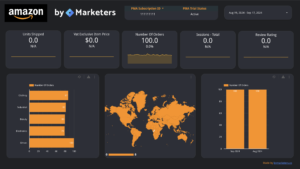
Step 8: Protect Your Amazon Account Security:
is important because your Amazon account contains payment and personal information. Crucial Security Advice.
Turn on Two, Step Verification Ensure that your password is strong.
It is not necessary to use the same password for all your applications.
Keep checking your login history from time to time
Sign off from any devices that you do not recognize. 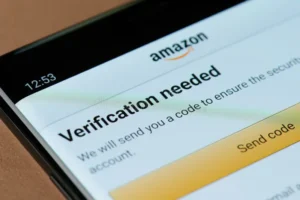
These are some of the ways in which the chance of a hacker managing to get into your account is greatly lowered.
Step 9: Start Shopping on Amazon:
- With all the setup out of the way, Amazon shopping is now within your reach.
- Just enter relevant keywords in the search bar and find what you want.
- To be sure, look at the reviews and ratings of the product.
- When you click Add to Cart, you keep the item.
- If you want to purchase additional items, go on shopping or if you are ready to take your purchase further, click Proceed to Checkout.
- Verifying that your address and payment information are accurate is always beneficial.
- Click the Place Your Order button to complete your order.
- There will be an email sent to you confirming your purchase.
Common Account Setup Issues & Fixes:
- Didnt Receive the Verification Email?
- Are you certain you don’t possess the code?.
- If you did not receive the confirmation code or if it has expired, you can click on Send New Code to resend the OTP.
- Please make sure that the email address you entered is the one that you have access to and that it is correctly typed.
- Enter the right password and email address to log in.
- Verify whether your bank accepts foreign or online transactions.
- Contact Amazon Support by phone or chat if the problem continues.
Bonus: How to Set Up an Amazon Seller Account:
If you are inclined to sell rather than simply buying, Amazon facilitates the process for you.
Steps to Open a Seller Account: Go to sellercentral.amazon.com.
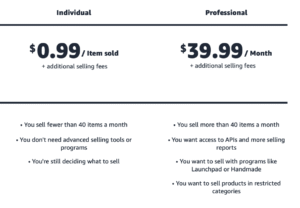
Press Sign Up. Select either an Individual or a Professional plan. First, provide your company information, tax details, and bank account. Then, confirm your identity (via documents or a video call).
Once you get the green light, go ahead and add your products and handle your sales.
Amazon Seller Central is like having the keys to your own ecommerce store.
Final Thoughts:
Creating an Amazon account takes just a few minutes, but what you can do with it is massive. Your account will allow you to: purchase without worries from reputable sellers Access Prime Video, Prime Music, and Kindle Get the most out of your orders launch your e, commerce business at Amazon Seller Central By following this guide’s steps to make, personalize, confirm, and protect your Amazon account, you will have a very convenient, quick, and safe shopping experience right in your home.
Benefits of Amazon Individual vs Professional Seller Account:
No monthly subscription fee Pay only when you sell a product Best for beginners and part, time sellers Low risk, low investment model Easy and fast account setup Ideal for selling limited, handmade, or used products Good for testing the Amazon marketplace No per, item selling fee Eligible for the Amazon Buy Box Access to advanced Seller Central tools Can run Sponsored Ads, coupons, and promotions Full access to Amazon FBA (Fulfillment by Amazon) Better visibility and higher sales potential Suitable for scaling and long, term business growth Ideal for sellers selling more than 40 items per month.